|
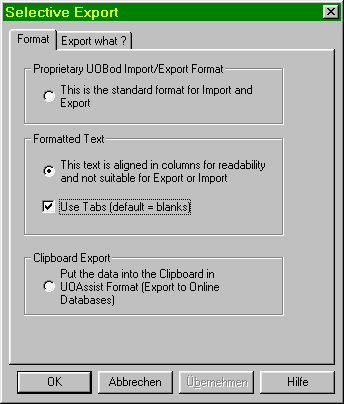
File/Export/ Textfile In the Format tab you can determine how your data will be written.
This writes a text file containing all info about the Bods you are exporting. Prices and assignment to Bod Books is retained, but the book's names are not. (Numbers will replace the actual names) If you intend to read your data back into your own or some other UOBod installation, you must use this format. (see File\Import\Textfile for a complete description of the Sbod and LBod format).
Formatted Text Contains the same information as described above but in a more readable form. The columns are aligned and padded with spaced. This format is good for printing or creating list, but cannot be read back in by UOBod.
Clipboard Export Generates the same output as described in File\Export\To Online Databases, but only for those Bods that you select in the "Export what" tab.
Export What ?
Filename: UOBod offers a smart default here that is taken from the other choices you make. Still it can be overwritten if you need a different naming convention..
This dialog lets you determine which Bods to export. You can select the export according to type (LBods or Sbods), Sections (Smith Color, Weapon, Leather, Cloth etc.) Material, quality and amount. |

 Proprietary UOBod Import/Export Format