List missing SBodsThis causes UOBod to output a list of all partially filled LBods together with the SBods they lack
You can adjust the maximal number of missing SBod allowed here for an LBod to be listed. Numbers up to and including 6 are valid. With "6" you will get a list of all your LBods including entirely empty ones, because none of these needs more then 6. If you set this to "1" only your LBods with just one SBod missing will be listed. List LBods alone
Shows the LBods only and their current filling state. SBods included are easily identified by their 3-letter code. Available but not yet combined Sbods are marked by "fit". What the missing parts are, however, is not stated and remains unclear (unless you know the sequence of the SBods in all Lbods) List LBods with SBods This is the default and it looks like this:
Within each paragraph the LBods is on top and it shows what has already been combined into it. (here: FeH =Feathered Hat, FaS = Fancy Shirt, ShP =Short Pants). Missing SBods appear on the following lines each one starting with a dot. (here: Sur =Surcoat) You can see how UOBod distinguishes between "available" and "integrated" SBods. An "available" SBod is listed among the missing ones in a row but you can see from the underscore as the first character in the line (mark the red arrow ) that you in fact own it and it can be combined with the LBod. In this form the report shows you all relevant information in a clear and easy way that is suitable for most purposes. Use a non-proportional font in your editor to keep the spacing and tabs aligned. The drawback is that such listing can be come quite large and suffer a lot of it's readability when sent via email or ICQ due to font changes and line wrapping. With this option all Sbods that are not mentioned among the missing ones (lines starting with either "_" or ".") will always be already combined into the LBod. List SBods alone
In short: Only non-existent SBods fitting into your LBods are listed with this. In spite of its brevity this list is unambiguous, so it will make up a nice shopping list for Vendor shopping or trading. |

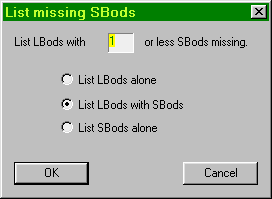 A "missing" SBod in that sense is any SBod that is not combined with its corresponding LBod. So all SBods that you have in your database and that match an
empty slot in an LBod you also own will be listed among the "missing" as long as they are not yet combined. However, for the number that you can specify in this field, such Sbods do not count. The list that is generated will contain Lbods with only one Sbod "really" missing. Those that you have, but have not
combined yet will be listed, but not counted.
A "missing" SBod in that sense is any SBod that is not combined with its corresponding LBod. So all SBods that you have in your database and that match an
empty slot in an LBod you also own will be listed among the "missing" as long as they are not yet combined. However, for the number that you can specify in this field, such Sbods do not count. The list that is generated will contain Lbods with only one Sbod "really" missing. Those that you have, but have not
combined yet will be listed, but not counted.

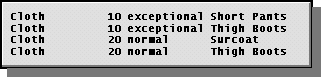 In this form only the missing SBods are listed for your LBods and there is no direct hint to the corresponding LBods (being somewhat experienced you will of course know that "Short Pants" belong to the "Town Crier" LBod etc.).